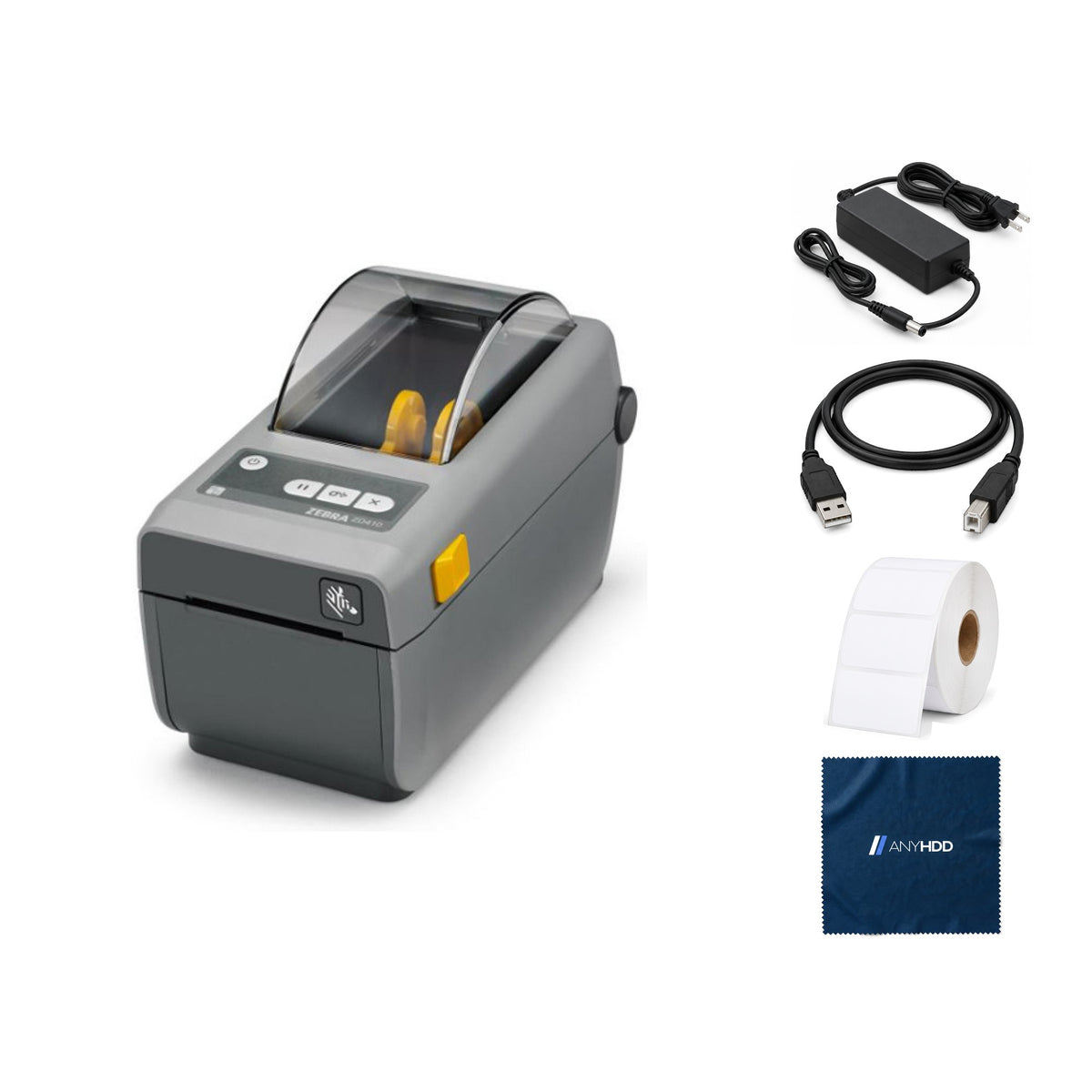

Zebra ZD410 Direct Thermal Desktop Label Barcode Printer USB+Ethernet Wired Shipping Office Use Renewed
Online ordering opens soon. Contact us for pricing and availability.

What's in the box.


Small labels. Small footprint.
The ZD410 is Zebra's 2-inch direct thermal desktop printer for product, barcode, specimen and file labels, sized to fit beside a register or a monitor.

Heat is the ink.
The ZD410 is direct thermal only: the printhead darkens heat-sensitive labels, with no ribbon, ink or toner.
It takes media up to 2.36 inches wide, so it is built for small product, barcode and shelf labels. 4-inch shipping labels need a 4-inch printer such as the ZD421 or ZD220.

Pick a label.
See what it prints.
The ZD410 takes media from 0.585 to 2.36 inches wide and 0.25 to 39 inches long. Choose a common size to see how it fits the 2.2-inch print area and how long it takes at full speed.
Dot counts are the printable part of the label (up to the 2.2-inch print width) multiplied by 203 dots per inch, rounded down. Times are the label length divided by the maximum 6 in/s; the first label after a pause takes slightly longer. Media ranges are Zebra's published specifications.
USB and Ethernet, ready to share.
This ZD410 has USB 2.0, a USB host port and the Ethernet (RJ45) module fitted in the rear modular slot, so any computer on the network can print to it.
Rear panel
- Power inDC · external supply
- USB hostType-A
- USBType-B · USB 2.0
- EthernetRJ45 · 10/100 module
This listing
- Renewed · USB + USB host + Ethernet configuration
Takes the labels you already buy.
Direct thermal stock in the ranges below runs in the ZD410, on rolls or fan-fold. 4-inch-wide labels do not fit.
Built for fleets of small printers.
The ZD410 runs ZPL II and EPL 2, so it slots into systems already printing to Zebra.
ZPL II and EPL 2
Plus EPL line mode, XML and ZBI built in.
Modular connectivity
Field-installable Ethernet or serial module in the rear slot.
Print Touch (NFC)
Tap an NFC-enabled Android device on the Print Touch logo to pair (not on all models).
64 MB for formats
User-available flash for forms, fonts and graphics.
Works with the computer you have.
Zebra's Windows driver installs with Zebra Setup Utilities. Mac and Linux print through the operating system's built-in Zebra label drivers, which Zebra doesn't support.
A free USB port or a network drop. Install the driver before turning the printer on.
Ink, toner or ribbons.
Renewed, the way we do it.
Every renewed ZD410 goes through the same five stations before it's listed. If it doesn't pass, it doesn't ship.
Intake and identification
Model, part number and serial logged, and the configuration label printed to record the printer's settings.
Full functional test
Printhead test pattern inspected for missing dots, sensors and platen checked, SmartCal run, test label printed.
Firmware and reset
Firmware checked against Zebra's current release. Settings returned to factory defaults; stored formats, fonts and network settings cleared.
Clean and grade
Printhead, platen and media path cleaned, exterior wiped, cosmetic grade recorded.
Repack
Packed with the power adapter, USB cable, label roll and AnyHDD microfiber cloth listed above, in a new box.
Backed by AnyHDD's one-year warranty and 30-day returns, with free return shipping on defective items. We've supplied IT hardware to businesses since 2006.
Tech specs
As published in Zebra's documentation for the ZD410.
| Model | Zebra ZD410 direct thermal, USB + Ethernet |
|---|---|
| Print method | Direct thermal |
| Resolution | 203 dpi (8 dots/mm) |
| Maximum print speed | 6 in (152 mm) per second |
| Maximum print width | 2.2 in (56 mm) |
| Maximum label length | 39 in (991 mm) |
| Media width | 0.585 to 2.36 in (15 to 60 mm) |
| Media roll | 5 in (127 mm) outside diameter; 0.5 or 1.0 in core; 1.5, 2 and 3 in with adapters |
| Media thickness | 0.003 to 0.0075 in (0.08 to 0.19 mm) |
| Media sensors | Full-width movable reflective/black mark; multi-position transmissive/gap |
|---|---|
| Interfaces | USB 2.0, USB host, 10/100 Ethernet (RJ45) in the module slot |
| Languages | ZPL II, EPL 2, EPL line mode, XML, ZBI |
| Memory | 512 MB flash, 256 MB SDRAM (64 MB user flash) |
| User interface | 3 buttons, 5 status icons |
| Power | Auto-detecting 100–240 VAC, 50–60 Hz; ENERGY STAR qualified |
| Operating environment | 40 to 105 °F (4.4 to 41 °C), 10 to 90 % non-condensing |
| Dimensions | 8.6 in L × 4.5 in W × 6.0 in H (220 × 115 × 151 mm) |
| Weight | 2.2 lb (1.0 kg) |
Sources: Zebra ZD410 spec sheet; Zebra ZD410 Desktop Printer User Guide.
Questions we get asked.
Will it print 4 × 6 shipping labels?
No. The ZD410 takes media up to 2.36 inches wide and prints 2.2 inches across. For 4 × 6 labels, look at a 4-inch model such as the ZD421 or ZD220.
Does it need ink or a ribbon?
No. It is direct thermal only and needs direct thermal labels.
How do I set it up?
Download the driver and Zebra Setup Utilities and install them before turning the printer on or connecting USB. Otherwise Windows may list it as an unspecified device.
How do I calibrate a new roll?
SmartCal: with media loaded, the cover closed and the status light solid green, press and hold Pause and Cancel together for two seconds. Re-calibrate only when changing media type, size or batch.
Can I add Ethernet later?
Yes. The rear modular slot takes a field-installable Ethernet (RJ45) or serial (DB-9) module. The field Ethernet module does not include the real-time clock that factory network models have.
How fast does it ship?
Every order ships with tracking. Delivery options and timing are shown at checkout.
What warranty comes with it?
One year from the date of delivery, covered by AnyHDD.
What if I need to return it?
If it fails in the first 30 days, you choose replacement or refund. There is no restocking fee, and refunds go back to your original payment method. If the item arrived defective, damaged, or isn't what you ordered, AnyHDD pays the return shipping; for any other reason the return label is yours to cover.
Does it keep anything from a previous owner?
Renewed units are reset to factory defaults before they ship, which clears stored label formats, fonts and network settings. We've supplied IT hardware to businesses since 2006.



