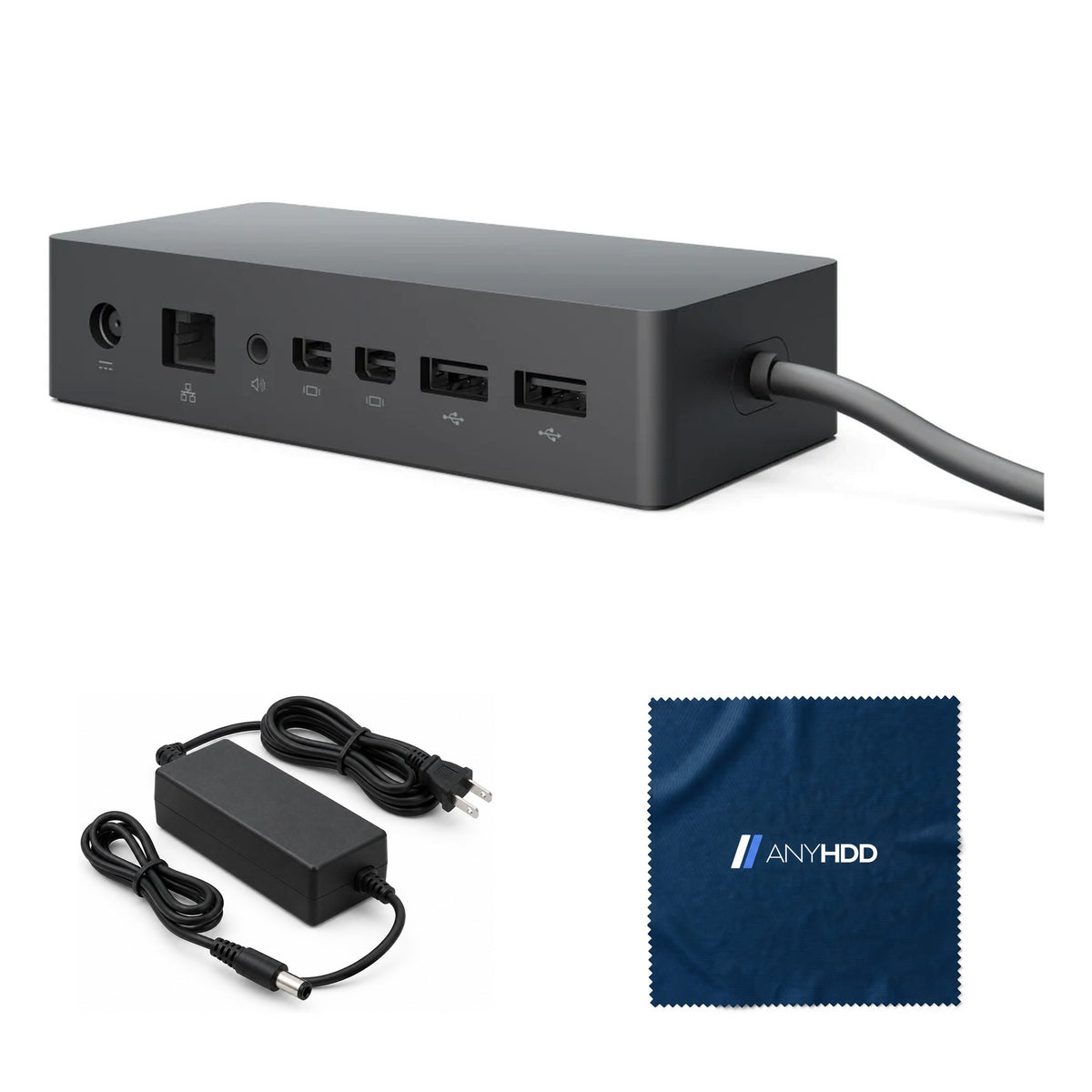

Microsoft Surface Dock PD9-00003 with Multi-Port Connectivity, Ethernet, 4 USB 3.0 & Audio
Desktop Expansion Hub for Surface Devices (Renewed)
Online ordering opens soon. Contact us for pricing and availability.

What's in the box.


Monitor cables are not included: the video outputs are Mini DisplayPort, so most monitors need a Mini DisplayPort cable or adapter.
One cable. Your whole Surface desk.
Plug the Surface Connect cable into your Surface and the dock takes over: charging, two monitors, wired network, four USB ports and audio out.

Charges while it works.
The 90 W power supply runs the dock and sends up to 60 W through the Surface Connect cable to your Surface, so the battery charges while your monitors are on.
The four USB ports share 30 W between them for phones, headsets and other accessories.
Microsoft does not publish a per-port USB figure for Surface Dock, only the 30 W total.
Up to two displays.
Pick your layout.
Two Mini DisplayPort outputs on the back. Choose one or two screens to see the maximum resolution Microsoft lists for each.
Figures are Microsoft's published maximums for Surface Dock. With two displays, lowering one display's resolution or refresh rate can allow more on the other. Monitors with HDMI, DVI or VGA inputs need an adapter (sold separately). On Surface Book, the Book's own Mini DisplayPort is covered by the dock connector; a Surface uses up to two external monitors at a time.
Every port, labeled.
Two USB ports on the front for quick plugging; video, network, audio and two more USB on the back. All four USB ports run at 5 Gbps.
Front
- USB-A 3.0 × 25 Gbps
Rear — video
- Mini DisplayPort 1.2 × 2up to 4096 × 2304 at 60 Hz on one display
Rear — data, audio and power
- USB-A 3.0 × 25 Gbps · 30 W shared by all four USB ports
- RJ45 EthernetGigabit · PXE boot · Wake-on-LAN
- 3.5 mm audiooutput
- Power in90 W power supply
- Security slotKensington lock, on the side
Wired where it counts.
Gigabit Ethernet gives your Surface a steady connection for calls and file transfers, and it is the port IT uses to boot and wake docked devices.
- Gigabit EthernetOne RJ45 port at 1 Gbps.
- Network PXE bootImage or recover a Surface over the wire, straight through the dock.
- Wake-on-LANWake a docked Surface from Connected Standby. Wake from hibernation or shutdown is not supported on this dock.
- 5 Gbps USBFour USB 3.0 ports for drives, keyboards and webcams.

Built for the whole floor.
Surface Dock is serviced the way IT already deploys software: one Windows Installer package.
Firmware by MSI
Microsoft's Surface Dock Firmware Update installs silently with msiexec, Configuration Manager or Intune and updates the dock in the background. Status shows in the registry and Event Viewer.
PXE boot
Network boot through the dock's Ethernet port, for imaging and recovery without a separate adapter.
Wake-on-LAN
Wake docked Surface devices from Connected Standby for overnight servicing.
Security slot
A Kensington-compatible lock slot on the side keeps the dock on the desk.
Works with your Surface.
Surface Dock connects through Surface Connect, the charging port on Surface devices. Microsoft lists every compatible model below; laptops without a Surface Connect port can't use it.
A Surface Connect port and Windows 10 or Windows 11. If your Surface isn't on Microsoft's list above, it isn't compatible with this dock.
No driver hunt. Plug in and Windows sets the dock up. Firmware updates come from Microsoft's Surface Dock Firmware Update (Windows 10 version 1803 or later; not from Windows in S mode).
Compatibility list from Microsoft's "Use Surface Dock" support page.
Renewed, the way we do it.
Every Surface Dock goes through the same five stations before it's listed. If it doesn't pass, it doesn't ship.
Intake and identification
Model and part number logged. Anything that isn't a genuine Microsoft Surface Dock is rejected here.
Full functional test
Every USB port loaded, both Mini DisplayPort outputs driven, Ethernet and audio checked, and charging confirmed on a Surface.
Firmware and reset
Current Microsoft dock firmware applied. Settings returned to defaults.
Clean and grade
Housing and attached cable cleaned and inspected. Cosmetic grade recorded.
Repack with the right power supply
Matched with a 90 W power supply and packed in a new box.
Backed by AnyHDD's one-year warranty and 30-day returns, with free return shipping on defective items. We've supplied IT hardware to businesses since 2006.
Tech specs
As published by Microsoft for Surface Dock.
| Model | Microsoft Surface Dock (model 1661), part PD9-00003 |
|---|---|
| Host connection | Surface Connect, attached 65 cm cable. Surface devices only |
| Video ports | 2 × Mini DisplayPort 1.2 (rear) |
| External displays | Up to two: one at 4096 × 2304, 60 Hz; two at 4096 × 2304, 30 Hz or 2560 × 1600, 60 Hz |
| USB-A ports | 4 × USB 3.0 (USB 3.1 Gen 1), 5 Gbps (2 front, 2 rear) |
| USB-C ports | None |
| Network | 1 × Gigabit Ethernet. PXE boot; Wake-on-LAN from Connected Standby |
| Audio | 3.5 mm audio out |
| Power supply | 90 W (15 V, 6 A); Microsoft model 1749 |
|---|---|
| Power to Surface | 60 W |
| USB load power | 30 W total |
| Security | Kensington lock slot |
| Operating systems | Windows 10, Windows 11 |
| Firmware servicing | MSI (Surface Dock Firmware Update) |
| Dimensions | 5.12 × 2.36 × 1.18 in (130 × 60 × 30 mm) |
| Weight | 1.21 lb (550 g) |
Sources: Microsoft Support (Use Surface Dock; Maximum display refresh and resolutions), Microsoft Learn (Surface Dock 2 overview comparison table; Surface Dock 1 Firmware Update), Microsoft Store tech specs (dimensions, weight).
Questions we get asked.
Will it work with my laptop?
Only with a Surface that has a Surface Connect port. Microsoft lists every compatible model in the compatibility section above, from Surface Pro 3 to Surface Pro (12th Edition), every Surface Laptop, Laptop Go, Laptop Studio, Surface Book and Surface Go. Laptops from other brands, and Macs, can't connect to it.
My monitor has HDMI. Can I still use it?
Yes, with an adapter. The dock's video outputs are two Mini DisplayPort 1.2 ports, so an HDMI, DVI or VGA monitor needs a Mini DisplayPort adapter or cable (sold separately). One monitor runs at up to 4096 × 2304 at 60 Hz; two run at up to 4096 × 2304 at 30 Hz or 2560 × 1600 at 60 Hz. Results depend on the Surface model and the monitor.
My devices stopped working after an update or a power cut. What should I do?
Reset the dock: unplug the power connector from the back of the dock, unplug the power supply from the outlet and wait five seconds, then reconnect the power connector to the dock and plug the power supply back in. That is Microsoft's documented reset.
My Surface isn't charging on the dock. Why?
If the Surface battery is completely empty, charge it for a few minutes with the power supply that came with your Surface, then try the dock again. Remove accessories that draw power. For Surface Book and Surface Laptop Studio performance models, Microsoft says to remove all accessories and make sure the dock is on its original power supply.
How do I update the dock's firmware?
Install Microsoft's Surface Dock Firmware Update (an MSI from Surface Tools for IT) on a Surface, then disconnect the Surface from the dock and reconnect it. The dock updates in the background. It needs Windows 10 version 1803 or later and isn't supported from Windows in S mode.
How quickly does it ship?
Every order ships with tracking. Delivery options and timing are shown at checkout.
What if it isn't right for me?
You have 30 days to return it, with free return shipping on defective items.
What warranty does it come with?
Every unit is covered by AnyHDD's one-year warranty at minimum.
Who is AnyHDD?
We've supplied IT hardware to businesses since 2006. Storage products we sell are erased to NIST 800-88 before they ship.



