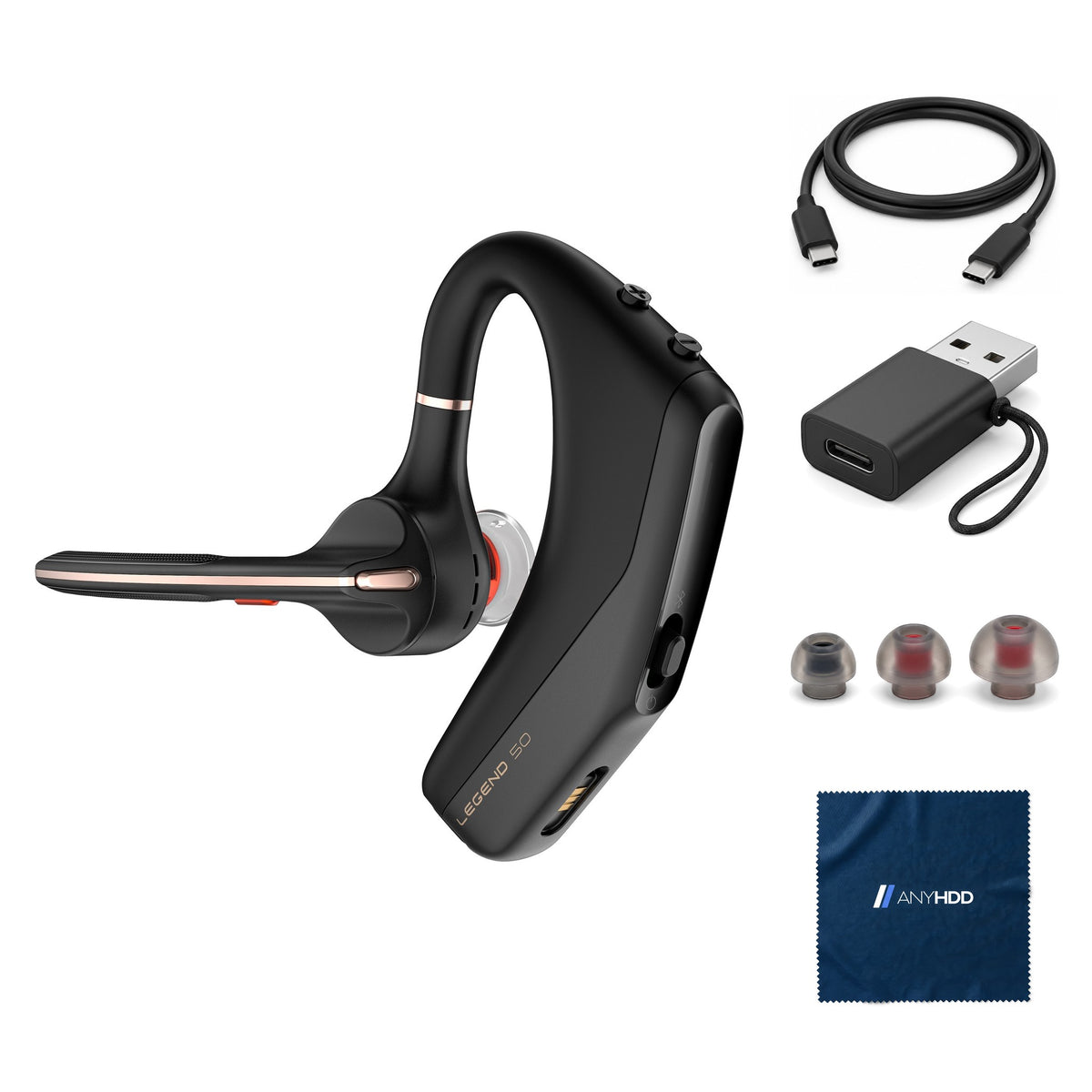

Poly Voyager 50 for Bluetooth Headset
4 Noise-Canceling Mics, PC, iOS, Mac, Tablet,
Online ordering opens soon. Contact us for pricing and availability.

What's in the box.


Your voice, not the street.
Four microphones and NoiseBlockAI keep the background off your calls, at your desk, in a café or outside on a windy day.

Your voice, not the street.
Four microphones, NoiseBlockAI and WindSmart work together to pick out your voice and block background noise, and smart sensors answer the call when you put the headset on.
- NoiseBlockAIMachine learning identifies and blocks background noise.
- WindSmartReduces wind noise outdoors.
- 4 microphonesDigital MEMS, 100 Hz – 8 kHz bandwidth.
- Smart sensorsPut it on to answer; take it off and the call button locks.

Ten hours on a charge.
Up to 10 hours of talk time on a single charge.
Charge over the included USB-C cable in under an hour and a half.
Standby time is not published by HP and is left out. Figures from HP's Legend 50 datasheet (AV4P1AA) and the Legend 50 user guide.
Phone, computer, or both.
Tap what you're connecting to see how the Legend 50 links to it.
Remembers up to 8 devices and connects to 2 at a time. Source: Legend 50 user guide; HP datasheet AV4P1AA.
Controls and connections.
Everything you need on the earpiece.
On the headset
- Call buttonanswer, ignore, end
- Mutemute and unmute
- Volume + / –two buttons
- Power slide switchslide and hold to pair
To your computer and phone
- Bluetooth 5.4pairs directly, Swift Pair on Windows
Charging
- USB-C cablefor the headset
- USB-C to USB-A adapterfor USB-A ports
Made for calls on the go.
This is the standard Legend 50 (not the UC model). It pairs with your phone and computer over Bluetooth and works with everyday calling and meeting apps; HP lists no collaboration-platform certification for this model.
- Smart sensorsPut it on to answer; take it off and the call button locks.
- Wear either earRotate and twist the boom to switch sides.
- Voice assistantSiri and Google Assistant from the call button.
Built for the whole team.
A personal headset IT can still standardize on: manageable and TCO Certified.
Firmware and settings
HP Poly Studio (formerly Poly Lens) updates firmware and settings.
Hearing protection
SoundGuard acoustic protection.
Sustainability
TCO Certified (model PBVL50).
Wear it all day
Three eartip sizes and a wear-either-ear boom.
Works with what you already own.
Phones and computers over Bluetooth 5.4: no dongle needed.
Built-in Bluetooth: the headset pairs directly (Swift Pair on Windows). To charge, a USB-C port, or a USB-A port with the included adapter.
No driver. HP Poly Studio is optional, for firmware, settings and call control in some softphones.
Factory sealed, ready to connect.
This one is factory sealed, so it skips the bench entirely — it ships exactly as it left the manufacturer, with the AnyHDD extras packed alongside.
Original Poly carton
New stock in the manufacturer's sealed retail packaging, never opened.
Poly accessories inside
Everything Poly packs in the carton stays in the carton.
Ready to connect
Packed alongside the sealed carton: an AnyHDD microfiber cloth.
Backed by AnyHDD's one-year warranty and 30-day returns, with free return shipping on defective items. We've supplied IT hardware to businesses since 2006.
Tech specs
As published by HP for the Poly Voyager Legend 50 (AV4P1AA).
| Model | Poly Voyager Legend 50 (AV4P1AA) |
|---|---|
| Wearing style | In-ear, mono, over-the-ear; wear on either ear; 3 eartip sizes |
| Microphones | 4 noise-canceling; NoiseBlockAI; WindSmart; 100 Hz – 8 kHz |
| Speaker | 13.6 mm; 100 Hz – 20 kHz |
| Connection | Bluetooth 5.4 (A2DP, AVRCP, HFP, HSP) |
| Wireless range | Up to 98 ft |
| Multipoint | Up to 8 paired, 2 connected at once |
| Talk time | Up to 10 h |
|---|---|
| Charge time | Under 1.5 h |
| Battery | Rechargeable Li-ion, 130 mAh |
| Ecolabel | TCO Certified |
| Hearing protection | SoundGuard |
| Weight | 0.045 lb headset |
Sources: HP datasheet Poly Voyager Legend 50 Headset (AV4P1AA, c09099659); Poly Voyager Legend 50 user guide.
Questions we get asked.
Can it connect to my phone and my computer at the same time?
Yes. It remembers up to eight devices and connects to two at a time.
Does it come with a USB Bluetooth dongle?
No. This bundle has no USB dongle: the Legend 50 pairs directly with your computer's built-in Bluetooth (Swift Pair on Windows) and with your phone.
Can I wear it on my left ear?
Yes. Rotate the boom up, twist it so the eartip is on the other side, then lower the boom.
How do I charge it?
Plug the USB-C cable into the headset; a full charge takes under an hour and a half.
My computer only has USB-A ports.
Use the included USB-C to USB-A adapter with the charging cable.
Which ear tip should I use?
The bundle includes three sizes: small, medium and large. Pick the one that sits snugly without pressure.
Does it announce who's calling?
Not by itself: HP removed native caller ID announcement on the Legend 50. Turn on caller announcement in your phone's settings instead (on iPhone: Settings > Siri > Announce Calls > Headphones Only).
How quickly does it ship?
Every order ships with tracking. Delivery options and timing are shown at checkout.
What if it isn't right for me?
You have 30 days to return it, with free return shipping on defective items.
What warranty does it come with?
Every unit is covered by AnyHDD's one-year warranty at minimum.
Who is AnyHDD?
We've supplied IT hardware to businesses since 2006. Storage products we sell are erased to NIST 800-88 before they ship.



