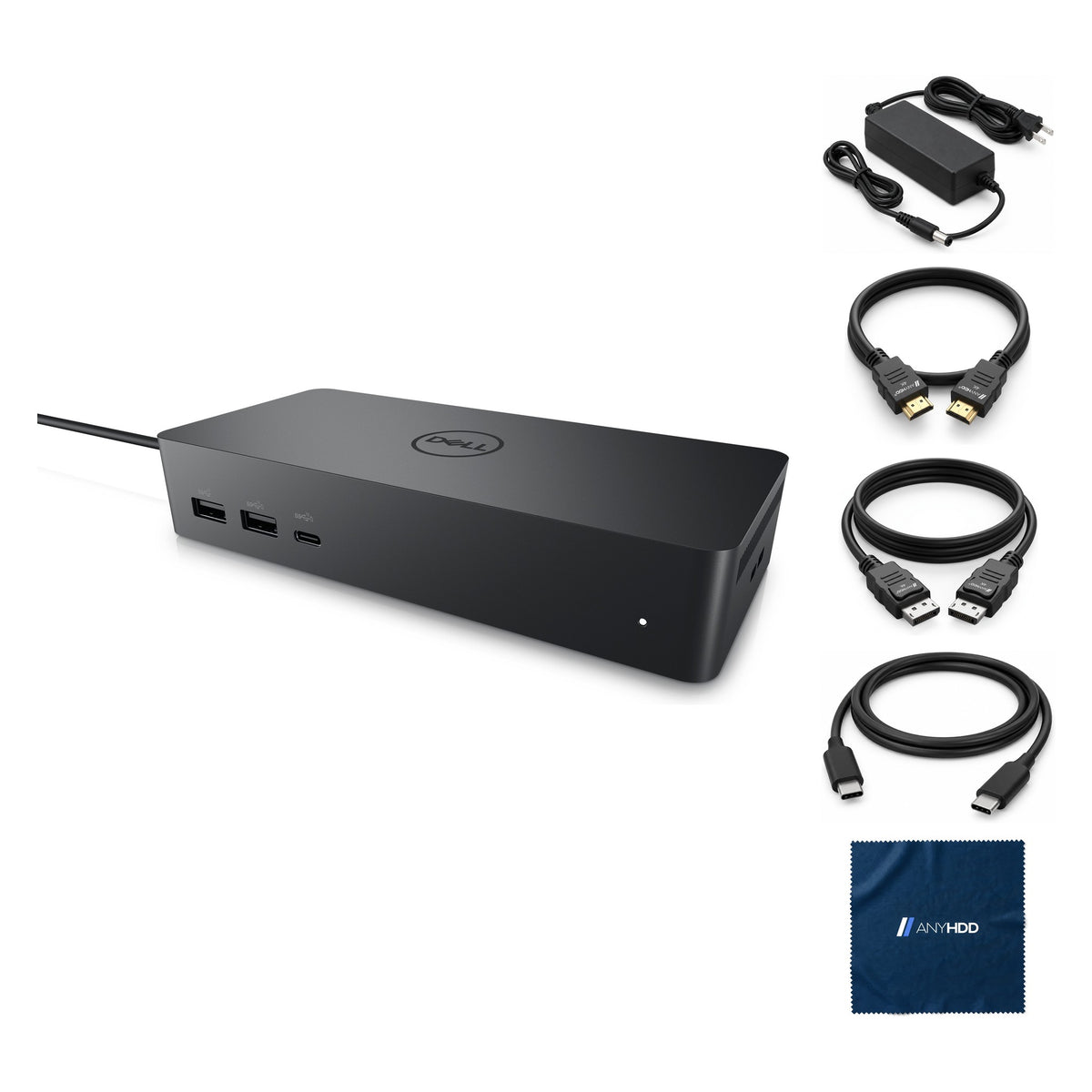

UD22 dell docking station dual monitor bundle usb c usb a universal dell dock for laptops comes with 130w adapter anyhdd hdmi displayport usb c cables cloth supports dual triple 4 monitors
Online ordering opens soon. Contact us for pricing and availability.

What's in the box.


One cable. Four screens.
The UD22 combines DisplayLink and DisplayPort Alt Mode: up to four displays, Gigabit Ethernet, six 10 Gbps USB ports and up to 96 W of charging, through one USB-C cable.

Charges while it works.
The 130 W adapter powers the dock and sends up to 96 W to the laptop over USB-C (Power Delivery 3.0). Dell's adaptive power delivery balances that against what the dock itself is using: about 75 W to the laptop with two 4K displays and a few USB devices running, 60 W with three or four displays.
The USB ports also work as a charging station: with the dock on its adapter, phones and power banks charge even with no laptop connected.

Up to four displays.
Pick your laptop and layout.
Two DisplayPort run by DisplayLink, plus HDMI and USB-C on DisplayPort Alt Mode. Choose your laptop's DisplayPort capability and how many screens you run.
DP-1 and DP-2 are DisplayLink outputs: they run through the UD22 driver over the USB link. HDMI and the rear USB-C are DisplayPort Alt Mode outputs that share the laptop's own DisplayPort signal, so what they can do depends on the laptop.
Dell requires the UD22 driver (Synaptics DisplayLink graphics and network) for full function. Without it, DP-2 stays dark, and DP-1 or the rear USB-C (one at a time) plus HDMI run on Alt Mode.
Figures from Dell's UD22 resolution table with the driver installed (DP 1.2 = HBR2, DP 1.4 = HBR3, DSC = Display Stream Compression at 2.1:1 or better). Each monitor's EDID also limits them; on Linux the external count is one less. Dell's troubleshooting notes that some graphics configurations support fewer external displays. HDCP: up to HDCP 2.2 input with HDCP 1.1 output, on Intel-based Windows laptops only.
Ten ports, front and back.
Video, network, two USB-A and a USB-C on the back; two USB-A and a USB-C up front. Every USB port runs at 10 Gbps.
Front
Rear
DP-1 sits next to HDMI, DP-2 next to Ethernet.
Front
- USB-A 10 Gbps4.5 W
- USB-A 10 Gbps, PowerShare10 W, BC 1.2
- USB-C 10 Gbps, PowerShare15 W; 7.5 W when the rear USB-C is in use
Rear — video
- DisplayPort++ 1.2 × 2DisplayLink · 4K 60 Hz each
- HDMI 2.0DisplayPort Alt Mode
- USB-C with DP 1.4 Alt Modevideo · 10 Gbps · 7.5 W
Rear — data and power
- USB-A 10 Gbps × 24.5 W each
- Gigabit EthernetWake-on-LAN, MAC pass-through on select Dell systems
- Power in 7.4 mm130 W adapter
- Host cable USB-C, 0.8 mto the laptop
Wired where it counts.
Gigabit Ethernet gives a laptop that lives on Wi-Fi a steady connection at the desk, and six 10 Gbps USB ports keep up with fast external drives.
- Gigabit EthernetRJ45, 10/100/1000 Mbps: solid green on link, flashing amber on activity.
- Wake-on-LANFrom sleep (S3) and modern standby (S0ix) with select Dell systems, on Windows.
- MAC address pass-throughWith select Dell systems: the laptop keeps its own network identity through the dock.
- 10 Gbps on all six USB portsFour USB-A and two USB-C, all USB 3.2 Gen 2.
Built for the whole floor.
One USB-C dock for mixed fleets, managed like the rest of Dell's commercial docks.
Dock firmware utility
A Windows update tool from dell.com/support; the Administrator's Guide covers stand-alone firmware and driver updates for IT.
VESA mount
Two 100 × 100 mm VESA mounting holes (M4 screws) to mount the dock behind a monitor or under a desk.
Two lock slots
A Kensington nano lock slot and a Kensington security-cable slot on the right side.
Charging station
With the dock on its adapter, its USB ports charge phones and power banks even with no laptop attached.
Works with what you already own.
A USB-C laptop with DisplayPort Alt Mode, from Dell or any other maker. Dell laptops add Wake-on-LAN and MAC address pass-through.
A USB-C port with DisplayPort Alt Mode, as Dell specifies for the UD22. Update the laptop's BIOS and graphics driver first: Dell warns older versions may not recognize the dock.
The UD22 driver set (Synaptics DisplayLink USB graphics and network) from dell.com/support, for full function. Dell also recommends taking the latest dock firmware.
Factory sealed.
This one is factory sealed, so it skips the bench entirely — it ships exactly as it left the manufacturer.
New stock arrives sealed and stays that way, so there is no bench record to show.
It carries the same 1-year AnyHDD warranty as everything else on the site.
Tech specs
As published in Dell's UD22 user guide.
| Model | Dell Universal Dock UD22 |
|---|---|
| Host connection | USB 3.2 Gen 2 Type-C, 0.8 m cable. USB-C laptop with DisplayPort Alt Mode |
| Video ports | 2 × DisplayPort++ 1.2 (DisplayLink) 1 × HDMI 2.0 (Alt Mode) 1 × USB 3.2 Gen 2 Type-C with DisplayPort 1.4 Alt Mode |
| External displays | Up to four: two DisplayLink plus two Alt Mode (see the layout selector) |
| USB-A ports | 4 × USB 3.2 Gen 2, 10 Gbps (2 front, one PowerShare and BC 1.2; 2 rear) |
| USB-C ports | 1 × front, PowerShare and BC 1.2 1 × rear with DisplayPort 1.4 Alt Mode |
| Network | RJ45, 10/100/1000 Mbps. Wake-on-LAN (S3, S0ix; Windows) and MAC address pass-through on select Dell systems |
| Power adapter | 130 W, 19.5 V / 6.67 A, 7.4 mm barrel |
| Power delivery to host | Up to 96 W (Power Delivery 3.0), adaptive: about 75 W with 2 × 4K and USB load, 60 W with 3–4 × 4K |
|---|---|
| Power delivery, USB | Front USB-C 15 W (7.5 W with rear USB-C in use) · Front USB-A PowerShare 10 W · Rear USB-C 7.5 W · Other USB-A 4.5 W |
| LED indicators | Adapter LED white. Dock LED amber (powered, no computer), white (computer connected). RJ45 green link, amber activity |
| Operating systems | Windows 10 and 11; Ubuntu 20.04/21.10 and later; macOS 12.2.1 and later; ChromeOS R100 and later |
| HDCP | Up to HDCP 2.2 input, HDCP 1.1 output; Intel-based Windows laptops only |
| Dimensions | 6.53 × 2.99 × 1.26 in (166 × 76 × 32 mm) |
| Weight | 0.92 lb (416 g) |
| VESA mounting | 100 × 100 mm, M4 × 0.7 screws |
| Operating temperature | 0 °C to 35 °C |
Source: Dell Universal Dock UD22 User Guide (package contents, parts and features, display resolution tables, docking specifications, smart and adaptive power delivery, FAQ, troubleshooting).
Questions we get asked.
Will the UD22 work with my non-Dell laptop, or a Mac?
Dell specifies a USB-C port with DisplayPort Alt Mode. With that, Dell lists Windows 10 and 11, Ubuntu 20.04/21.10 and later, macOS 12.2.1 and later, and ChromeOS R100 and later. Wake-on-LAN and MAC address pass-through work with select Dell systems only.
Install the UD22 driver for the DisplayLink outputs (DP-1 and DP-2); HDMI and the rear USB-C work through the laptop's own Alt Mode.
How much power does it give my laptop?
Up to 96 W over USB-C from the 130 W adapter. The UD22 balances power with its own load, so with two 4K displays and USB devices running Dell rates it at about 75 W, and 60 W with three or four displays. The USB ports keep charging phones with no laptop connected.
A hardware installation window appears when I plug something into the dock. Is that normal?
Yes. Windows identifies each new USB device on the dock's hub and installs it, and may show an installation notice the first time. It happens once per device.
Why does the dock's fan run, and what if it gets loud?
The fan is temperature-controlled with five speeds. It spins briefly when you plug in the adapter, by design, and otherwise only when the dock warms up. A loud fan means it's running hot: check that the vents aren't blocked and the room isn't above 35 °C. If over-temperature protection shuts the dock down, unplug the USB-C cable and the power, wait 15 seconds, and reconnect power.
My devices stopped responding after a power cut. What should I do?
The UD22 runs on AC power only and has to renegotiate its power contract with the laptop after an outage. Unplug the USB-C cable from the laptop and the adapter from the dock, reconnect the adapter first and the laptop second.
How fast does it ship?
Every order ships with tracking. Delivery options and timing are shown at checkout.
What warranty comes with it?
One year from the date of delivery. It may also be eligible for the original manufacturer's warranty, but AnyHDD's own 1-year coverage applies either way.
What if I need to return it?
If it fails in the first 30 days, you choose replacement or refund. There is no restocking fee, and refunds go back to your original payment method. If the item arrived defective, damaged, or isn't what you ordered, AnyHDD pays the return shipping; for any other reason the return label is yours to cover.



